
Find Campaigns
Dashboard → Campaigns
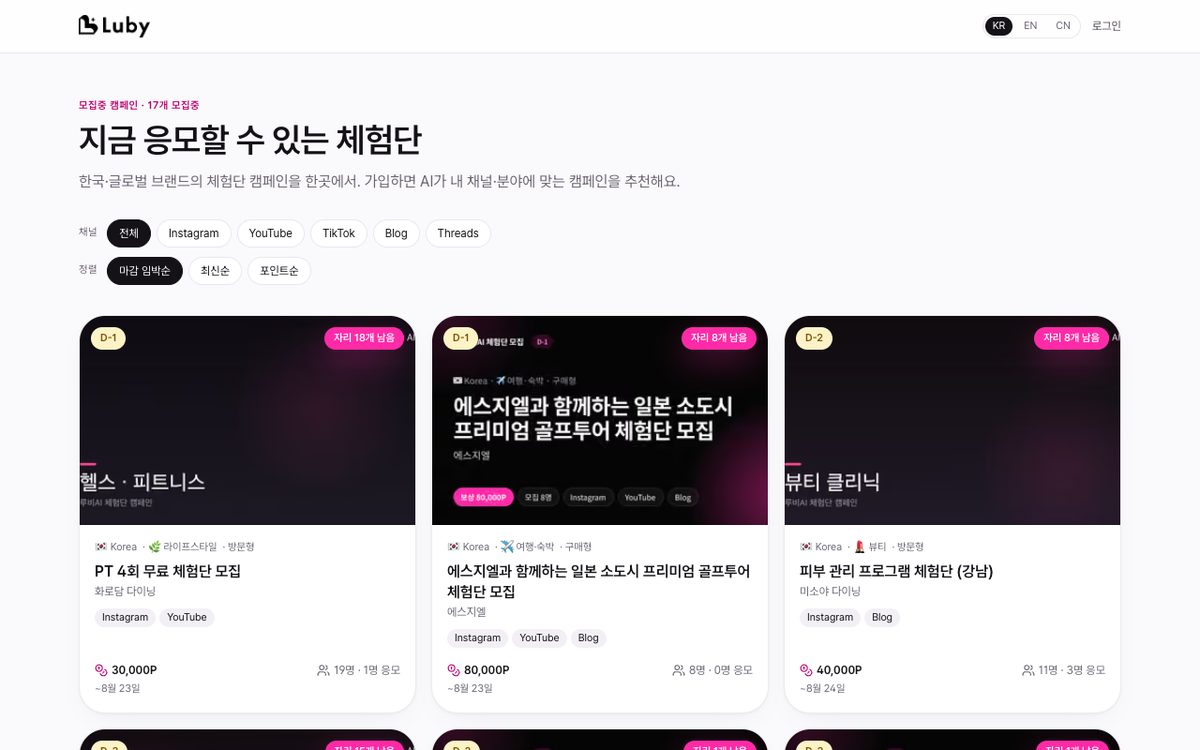
- Default sort is Recommended (reflects your specialties, region, and application status). Badges:
N slots remaining(campaigns with fewer applicants than recruitment capacity, meaning higher selection odds),My Specialty,My Region,Applied/ Sort by newest, deadline soon, or points, plus industry and region filters - The public directory viewable without login (luby.im/c, including EN/CN) also supports deadline soon, newest, and points sorting and channel/region filters
- Overview home shows 3 "Campaigns For You" · number of new campaigns this week · a morning alert if a campaign in your specialty is closing within 48 hours
- Instant new campaign alerts: When a campaign matching your specialties (or your activity region + the channels you have) starts recruiting, you'll get an immediate notification, push, and email (max 1 per day; the rest are compiled into the Monday digest). The more complete your specialties, region, and channels are, the more accurate this gets. You can turn this off under Reminders & Recommendations in
Settings → Email Notifications. - Campaign Details: Missions (per channel), what's provided, recruitment period, points, and a link to the advertiser's profile
- The Selection Likelihood card on the right of Campaign Details shows a High/Medium/Low rating based on competition ratio (applicants/recruitment capacity, days remaining), match with your specialty/region/channel, and your completion history, along with improvement tips (register a channel, add a specialty, write an application message). This is an estimate for reference only — final selection is made by the advertiser
Was this page helpful?
Last updated 2026-08-19